
celuLOC3.65 - Google Play
You'll be able to see results in few seconds.
Publisher Description
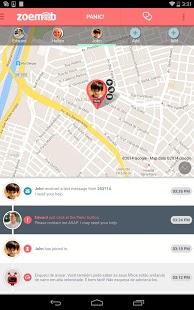
The ZoeMob Family Safety is a very accurate service to monitor your family using GPS tracking technology. A safe way to track the location of your kids on the map 24 hours per day. Peace of mind for you when you are not close to their loved ones. All they need is Android phone with the app installed.
▌ SOME FAMILY SAFETY FREE FEATURES?
★ Current location
Check the current location for all family members instantly.
★ Places Alerts (geofence)
Receive alerts when your family members arrive at school or at home. Or even if they are nearby or far away from a place you have determined in the map (it´s like a automatic check-in!).
★ Family Messenger
Keep in touch and chat with your family with no cost. Using ZoeMob, all family members can send and receive text messages by the Family Messenger, a exclusive and private channel.
Notice: Free accounts are eligible for a 7-day trial of Premium Subscription. But don't worry after that: you always can keep using the free version with some features limitations or or choose a premium plan when you want.
▌ WHAT USERS ARE TALKING ABOUT FAMILY SAFETY?
"It works My husband just LOVES the way he can read every single message I send or receive, but it is also nice piece of mind for me when I have no phone service ams he is 800 m miles away working. My kids will so have this when I get them phones". Jodi Anderson
"Cool app I can keep tabs on everything my kids do."
"Yap this the excellence World now in too much advance so that very need to develop our personal movements, ZOEMOB is the one of way of go ahead for man.....thanks"
"Great family locator This app makes it easy to find your family and friends. Excellent usage of the Android's GPS capabilities!".
"Five stars family locator I had heard some much about this app. Now that i HAVE IT on my Samsung Galaxy S. My family just love it. It’s such a smart thing to have on the phone."
▌ HOW ADD A NEW FAMILY MEMBER?
1) Download and install Family Safety app to your mobile device
2) Invite your family members to join to your new family network
3) Once they accepted, agreed your invitation and installed the app in their mobile devices, Family Safety begins monitoring them
Important: All family members must have full knowledge that this app is installed and running on their device. So he/she must agree that is being monitored.
With Family Safety you can access your family's information online with your smartphone , desktop computer or tablet and to feel comfortable even if you aren't near your children and family members.
▌ PREMIUM SUBSCRIPTION FEATURES
* UP TO 5 family members in the same account
* UNLIMITED current location and gps tracking history
* UNLIMITED places alerts (geofence)
* UNLIMITED over speed alerts
* UNLIMITED text message (SMS) alerts (anti bullying and anti sexting)
* UNLIMITED Family Messenger
* UNLIMITED Panic Button
* No advertising
* Priority Support
▌ CUSTOMER SUPPORT AREA
Submit your request via our online support system and receive a response within few hours. Contact us at http://support.zoemob.com
Family Safety is powered by ZoeMob safety platform and can be used in conjunction with other software versions on the same platform. But remember: some free versions may have different features.
About celuLOC
The company that develops celuLOC is TWT Digital. The latest version released by its developer is 3.65.
To install celuLOC on your Android device, just click the green Continue To App button above to start the installation process. The app is listed on our website since 2014-11-17 and was downloaded 0 times. We have already checked if the download link is safe, however for your own protection we recommend that you scan the downloaded app with your antivirus. Your antivirus may detect the celuLOC as malware if the download link to com.celuloc.client is broken.
How to install celuLOC on your Android device:
- Click on the Continue To App button on our website. This will redirect you to Google Play.
- Once the celuLOC is shown in the Google Play listing of your Android device, you can start its download and installation. Tap on the Install button located below the search bar and to the right of the app icon.
- A pop-up window with the permissions required by celuLOC will be shown. Click on Accept to continue the process.
- celuLOC will be downloaded onto your device, displaying a progress. Once the download completes, the installation will start and you'll get a notification after the installation is finished.
Program Details
System requirements
Download information
Pricing
Version History
version 3.65
posted on 2014-11-17
version 1.0
posted on 2010-11-16
Several fixes and updates
Disclaimer
Official Google Play Link
We do not host celuLOC on our servers. We did not scan it for viruses, adware, spyware or other type of malware. This app is hosted by Google and passed their terms and conditions to be listed there. We recommend caution when installing it.
The Google Play link for celuLOC is provided to you by apps112.com without any warranties, representations or guarantees of any kind, so access it at your own risk.
If you have questions regarding this particular app contact the publisher directly. For questions about the functionalities of apps112.com contact us.
